
1. Windows & macOS Recording Setup
How BJs record clean local masters alongside 외부 앱에서 방송하기 RTMP streams, and how authorized editors capture pandalive.co.kr with isolated per-app audio and crash-safe .mkv files.
PandaLive (pandalive.co.kr) does not provide a built-in "save stream" button for general viewers, and web tools claiming to rip PandaLive URLs routinely fail on login-gated rooms or violate platform rules. This independent handbook explains the real replay, broadcaster archive, and authorized local recording options available today.
pandaliverecorder.com does not accept stream URLs, host bots, or bypass room locks.pandalive.co.kr and the official mobile app whenever a BJ leaves archives enabled.Your legitimate options depend on whether you are the broadcasting BJ, an authorized clip editor with creator permission, or a viewer catching up on past shows.
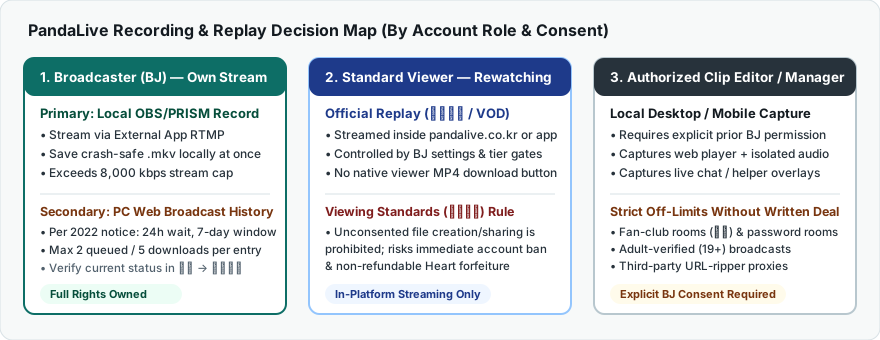
Distinguishing verified platform capabilities from historical announcements and unsupported third-party tools.
| Workflow / Method | Who Can Use It | Platform & Policy Status | Key Limitations |
|---|---|---|---|
| Official VOD Replays (다시보기) | Viewers (guest or logged-in depending on room rating) | Verified Feature Built into PC Web & mobile apps | In-app/browser streaming only (no MP4 export). Availability and retention depend on BJ settings, fan-tier gates (팬방), and adult verification (19+). |
| Simultaneous Local Recording During RTMP Broadcast | Broadcasters (BJs) streaming via 외부 앱에서 방송하기 | Recommended for BJs Supported directly in OBS Studio & PRISM Live Studio | Requires sufficient disk space and GPU encoder headroom on the broadcast PC. Captures raw studio scene unless web alerts (팬더티비 도우미) are layered in OBS. |
| Broadcaster Video Download Service (방송영상 다운로드) | Broadcasters downloading their own past broadcasts on PC Web | 2022 Official Notice Verify current status in 채널 → 방송내역 | Per PandaLive's Sept 30, 2022 launch notice: PC Web only; available 24 hours after broadcast end for 7 days; max 2 concurrent preparations and 5 downloads per entry; warned/blinded broadcasts excluded. Subject to policy changes by DoubleMedia. |
| Authorized Desktop or Mobile Screen Capture | Broadcasters, managers, or clip editors with explicit BJ consent | Consent Required Permitted only with creator authorization | Must isolate browser audio cleanly and avoid GPU black-screen conflicts. Mobile OS capture may be blocked or muted on restricted streams. Prohibited without BJ consent. |
| Third-Party "Paste URL" Rippers & Auto-Record Bots | Often marketed to general viewers | High Risk / Violates Rules Breaches 시청기준 | Cannot legally access 팬방, password, 풀방, or 19+ authenticated sessions without credential sharing (risking account theft, IP blocks, and permanent ban without Heart refunds). |
Many visitors arrive searching for a web form where they can paste a pandalive.co.kr channel URL and save an MP4. Understanding how PandaLive delivers live broadcasts explains why those services either fail outright or create severe security risks:
Throughout this site, we separate active core policies (such as external-app OBS/PRISM broadcasting specs and 시청기준 consent rules) from date-stamped announcements (such as the September 30, 2022 broadcaster download notice). Because DoubleMedia Co., Ltd. updates retention windows and channel tools via official notices on pandalive.co.kr, always confirm live menu availability inside your own account.
Focused technical documentation tailored to PandaLive's web player, external RTMP broadcast setup, mobile apps, and policies.
How BJs record clean local masters alongside 외부 앱에서 방송하기 RTMP streams, and how authorized editors capture pandalive.co.kr with isolated per-app audio and crash-safe .mkv files.
Using the official 팬더티비 mobile apps, multi-window PIP playback, regional App Store requirements, OS screen-capture blacks/mutes, and thermal limits.
Read Mobile Guide →How VOD replays are sorted and deleted, differences between 팬방, password, and 풀방 rooms, 본인인증 login gates, and Korean UI navigation without breaking player controls.
Explore Replays & Room Types →Diagnosing Chrome/Edge GPU acceleration black frames, overseas routing stalls to Korean CDNs, 해외 로그인 차단 blocks, and 48 kHz audio sync drift.
Open Troubleshooting Guide →Detailed review of PandaLive's prohibition on unconsented recording, Heart refund forfeiture rules, South Korean portrait rights (초상권), and broadcaster archive rules.
Review Rules & Permissions →Compare PandaLive's official ≤ 8,000 kbps stream cap against local 1080p60 archival bitrates and calculate exact GiB/GB disk requirements per session or month.
Use the Storage Calculator →